Pages

Subscribe:
Showing posts with label scal sure cuts a lot. Show all posts

Wednesday, February 9, 2011

Boy and Girl Bunny Treat Box...Easter????

There is a boy and girl version of these boxes. It is all in one file. There are 3 virtual mats. If you have 12x12 mat, keep moving over 12 inches to see rest of file to cut. (Set x to -12 to get middle mat, -24 to get 3rd mat).

Download the boy and girl bunny favor box

Please leave comments... I posted a lot of new stuff today. I've been working hard!

Monday, April 5, 2010

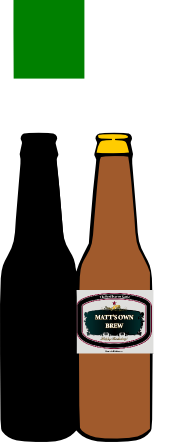
Beer Bottle Card

Someone asked for a beer bottle card or something to give a friend who brews his own beer. I made the card then found this label site that lets you make your own label with a message on it. Then you can print and cut the label to put on the beer bottle, giving it a more realistic look, than if you tried to cut it on your cricut.

That site to make your label is

http://start.beerlabelbuilder.com/
It allows you to put 3 messages on your label. I put The best beer on earth! at the top, Matt's Own Brew in the middle and Happy Birthday on the bottom.


Of course you can cut around the label better than I could digitally.

Here is the card template:


I guess you could make Two labels for the two bottle card.. Even more messages!


I wanted a tiara..so I made my own!


I needed a hat for my birthday themed Bunco Party tonight. I decided to make myself a crown! I used my Cricut of course! Here is the pattern for the crown. You can decorate it anyway you want with the jewels you cut from paper. Better yet, let your kids glue on some shiny sequins and beads from your craft stash. This would make a great birthday party craft.  To make it for a child, scale it a bit smaller when you import it into Sure Cuts a Lot. If you scale it to fit on 12x12 paper, it is the right size for an adult.
If you are using your own jewels, just delete them before you cut. They take the longest time to cut out!


Thursday, April 1, 2010

New Alpha Bet Cuts Font


Ths font will be great for teaching your little one their abc's. This font gives you each letter of the alphabet with an associated object that starts with that letter. For example, there is a zebra for z and a cat for C. The object for each letter can be cut separately too, to let you make your alphabet die cut in two colors. I also included the numbers with the appropriate amount of objects.  For example the 7 is surrounded by 7 fish.

 You can also use the font to make scrapbooking page titles of course! Or just use the objects alone. Once you download the font, just open it, BEFORE you open inkscape, sure cuts a lot, or Make the Cut.  Then the font Alpha Bet Cuts should appear in your font list. Select it and type in the letter of the alphabet.

Monday, March 15, 2010

St. Patricks Day Banner/Luck of the Irish

plus extra shamrock and the stencil font name to make your own message!

Easy to cut. The stencil letters cut out of the shamrocks.

Friday, March 5, 2010

Spring Tissue Box Cover..Make one for each Season!

Get the svg file to make a tissue box cover. Decorate it with the butterflies or any other thing you can think of from a cartoon character to a holiday theme to fairies in flight.
Get the box file here:


Get the scut2 file for this butterfly scene here:

Get the svg for this scene here. Resize to fit side of box:
I had to squish it a bit vertically but it looks okay.

Get another butterfly scene here:


It looks like this:


Enjoy! I can't wait to see the fancy things you guys come up with!


Another butterfly scene that would look nice:


Saturday, February 13, 2010

Baby_Cuts Font Available for Download


The baby_cuts font:

http://www.mediafire.com/?zk0gzdtzzfq

Baby_cuts character map:

http://www.mediafire.com/?2nmvmmmwnnm

I made another font for your use on Cricuts! Lots of files and titles related to babies! Enjoy!

Buy something from me if you like these free fonts! I have files as low as $3.00!

Wednesday, February 10, 2010

People Silhouette Font..update link to file


This font is mostly new images I recently bit traced. It contains more people silhouettes. I cut a few so you could see. On the babies cut I welded three babies from the font with a word from another font. Then I cut it on shadow mode. For some reason scal 2.10 messed up the shadow on the A, but it wasn't my font's fault.


People font character map
http://www.mediafire.com/?lr4zzd02eiw

PEOPLE_SVG FONT ttf file: NEW FILE LINK.PLEASE DOWNLOAD AGAIN...WAS WRONG FILE

http://www.mediafire.com/?enmbeiimmfi

I Made a Dingbat Font with Inkscape


Buried in Inkscape .47 is the ability to make your own SVG fonts. Kay at cleversomeday has been nice enough to take the time to figure out how to use the inkscape tool to create the SVG fonts and how to convert the svg font into a ttf font that you can use in inkscape and Sure Cuts A Log and Make the Cut to make cuts! Please go to her blog and get the tutorial if you are as excited as we were about making our own fonts.
http://cleversomeday.wordpress.com/2010/02/09/inkscape-dings/


Buried in the directories on my computer I have many svg files with silhouettes in them. I decided to turn them into some fonts. What is the advantage? Now I only have one file for each group of svg files, and it is a font file. I can access the images in the font just by selecting the font within Scal or MTC and typing in the letter corresponding to my image. That image can be welded to other images or words. I could even make a border out of my images by welding multiple ones.

To use the fonts, just open the font before you open your application program OR install the fonts on your computer. The fonts will show up as DANCE_SVG, SPORTS_SVG, CHILD_SVG.

Today I am premiering three fonts.

The CHILD_SVG font contains silhouette images of children and families.


Child character map
http://www.mediafire.com/?mz0ndmowynm

CHILD_SVG font

CHILD_SVG font:

http://www.mediafire.com/?mimizcuzzjm

The DANCE_SVG font contains dance, skater and gymnastic images for both males and females.


DANCE_SVG font character map:
http://www.mediafire.com/?uaom4zemkuq


DANCE_svg font:

http://www.mediafire.com/?tjymylytyaj


The SPORTS_SVG font contains sport images for soccer, basketball, lacrosse, baseball, softball, football,hockey and golf.


SPORTS_SVG character map
http://www.mediafire.com/?bjyd2ikycit

SPORTS_SVG font:


http://www.mediafire.com/?yenihdwzch5

It took me about 30 minutes to create each font AFTER I had copied all my images into the file. The gathering and resizing of the images took the most time.

Please try out my new fonts and see what you think. Even better, make YOUR OWN FONT!

Saturday, January 30, 2010

Valentine's Conversation Heart...Make Your Own for a Page or Card


First I used inkscape 47 to make these hearts. When I imported them into scal 2.0 the text was "messed up". I redid them in inkscape 46 and it works fine. I "grouped" each item, so you can ungroup it in scal 2.0 and move things around or delete them, without using inkscape. You could make your own messages in scal 2, but I couldn't figure out how to make my arial narrow font into a stencil font in scal 2.0 like I can in inkscape. Maybe you could just use a stencil font like stencilia instead of Arial narrow.

This file just has one heart and one background in it, then all the text messages, so you can make one or more at once.
Here is the svg file:


http://www.mediafire.com/?jnyqmyzotzn

If you have scal 2.0:

http://www.mediafire.com/?dytfamqa1at


Enjoy! I think these might be cute on a card too.

Thursday, January 21, 2010

Wednesday, January 20, 2010

Wednesday, November 18, 2009

Peek-a-boo Box


On this blog http://www.splitcoaststampers.com/resources/tutorials/peekaboobox
there were instruction on how to make a cute peek-a-boo box. THis is a small box, with a window in it, underneath a lid. You could follow the instructions there, or cut with your Cricut this svg file. Thanks to
Brenda Quintana for the great tutorial!


Link to file:


http://www.mediafire.com/?rnzddym2d0a

Monday, November 16, 2009

Box with a Window..NO A REAL WINDOW!


Window. window box, tree and garland:

http://www.mediafire.com/?kmyjmzmvykm

Attach clear plastic to inside of cutout on box(double sided tape or something strong). Put tree inside box, using "raised sticky dots" or something to give it a more 3 d effect. Fold box, putting strip of double tape on long edge of box. Fold in flaps. Attach window to front over clear plastic.

You can put something else in window if you like.
Related Posts Plugin for WordPress, Blogger...

Blog Archive